There can be ‘N’ number of ways to look at a problem and equally number of ways to solve it but we provide the best tip to minimize debugging efforts to solve it faster.
Let’s see our first tip here.
How do we find an accurate root cause if there exists a problem without much error info when we call Connect-REST/SOAP calls?
If you look at below error page when we run a Data Page sourced by a REST connector to bring info which has basic authentication, it says that something wrong with mapping.
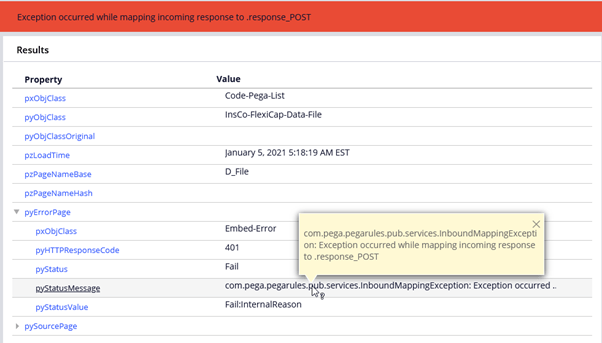
Even if we look at any logs, it just one-liner where we can’t get much detailed error information.

It’s Pega OOTB way to Look at It…
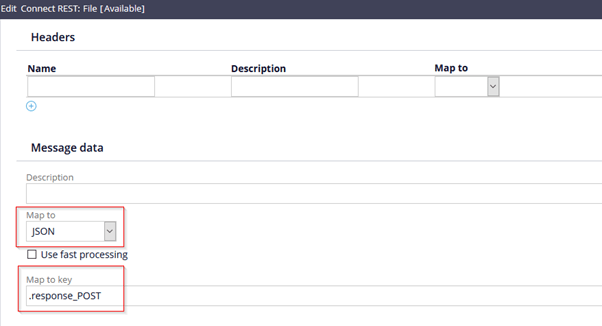
Open its REST connector and find the mapping protocol and property as shown below.
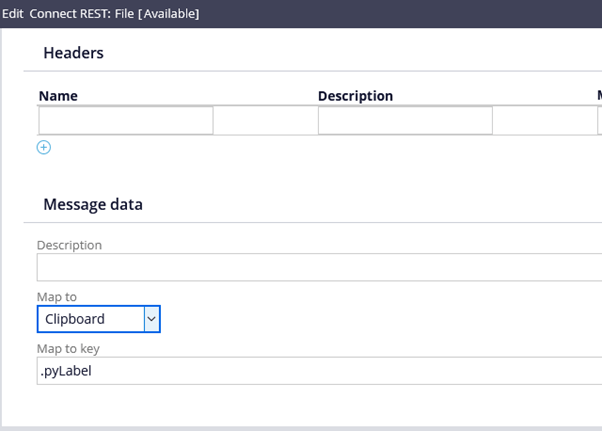
Change mapping method to ‘Clipboard’ and give some simple text property.
Now run the data page or source rule and check what you see there.
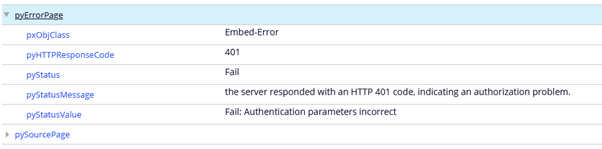
In our example here, it now displays that there is something wrong with the given authentication.
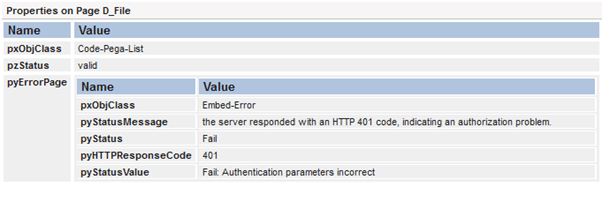
It’s now time to solve it and save your valuable debugging time.
Logic behind this Tip?
When we remove the connector mapping method (as the error is related to mapping) and map to the simple property, Pega tries to map it default error page with detailed information.
If this tip is useful for you in some-way then don’t forget to follow our page and subscribe to our video blog.


 Think & Grow with PegaOOTB