
There can be an ‘N’ number of ways to look at a problem and an equal number of ways to solve it but we provide the best tip to minimize debugging efforts to solve it faster. There can be an ‘N’ number of ways to look at a problem and an equal number of ways to solve it but we provide the best tip to minimize debugging efforts to solve it faster.
Let’s see our tip here.
What should we do when we see a frozen screen like below? Even after you restart or re-login, if you still see this issue then there is a serious problem with the setup. Let‘s understand it better!

First, let us understand what happens in the background when we trigger the context dictionary save operation. It’s an asynchronous operation when you click the ‘save’ button. So, the platform enables the ‘save’ button only when the job is done successfully, or else it won’t.
Trigger Point
There is a DSS (Dynamic System Settings) variable which does this trick. By default, they initialize to ‘false value and sets it to ‘true’ when the context dictionary save operation is triggered.
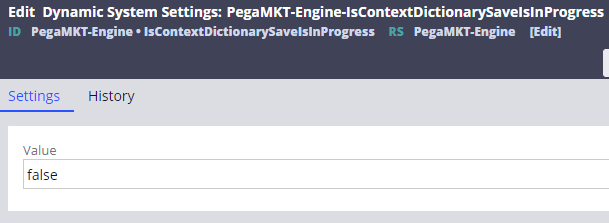
So ‘Save’ button on the Context Dictionary page in App Studio is controlled by this variable. If the value is true in any case, you don’t see that ‘Save’ button enabled.
Now with the above your information, you should be able to start investigation 😊 but it can’t help you to solve it. If you have this button enabled, you have now an option to investigate by triggering it again. So you got a lead now!
Investigate it in a style
Let’s get into the problem which we highlighted here. Let’s try to understand few basics here. App Studio’s context dictionary settings page has two ‘Definitions’ and ‘Audit Log’. In the Audit log tab, the platform lists if there are any errors while performing this save operation?
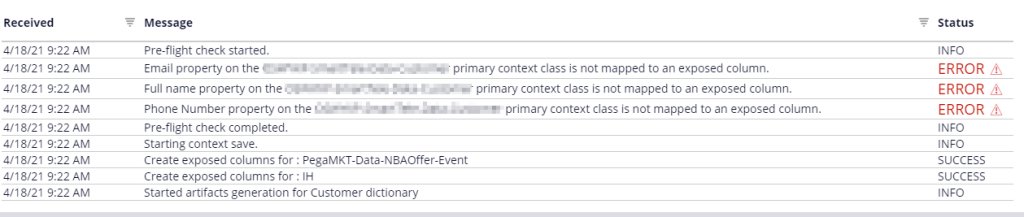
If Pega can list down those errors and providing for us to investigate then why the screen gets frozen? We mean, why the platform is unable to reset the above-mentioned DSS variable?
I think you got it almost, right? It might due to unhandled exceptions? Yes, the operation fails to update the audit log or reset variables because of possible unhandled runtime errors!
Now, if you can trace out the session by resetting the variable and trigger context save operation then you must be able to get few possible exceptions like below which we can categorize as
- Library Compilation Issues (If there are issues at CDH installation log)
- Database Connection Issues (If there are permissions issues or driver issues)
In this example, we tried to reproduce the problem statement and seen as below when we traced the session.
com.pega.pegarules.pub.runtime.LibraryFunctionNotFoundException: Failed to extract 'pegamkt_engine_pegamktutilities' at com.pega.pegarules.generation.internal.library.LibraryRuntime.resolveAndinvokeFunctionViaReflection(LibraryRuntime.java:195) ~[prprivate-generation.jar:?] at com.pega.pegarules.generation.internal.library.LibraryRuntime.invokeLibraryRuntime(LibraryRuntime.java:123) ~[prprivate-generation.jar:?] at com.pega.pegarules.generation.internal.library.LibraryFunctionUtilityImpl.resolveMethodCall(LibraryFunctionUtilityImpl.java:2932) ~[prprivate-generation.jar:?]
Solution
We have solved it by reimporting the CDH bundle again & corrected any database connection issues.
Tips and Tricks
We hope that we provided you a quick trick of what you should do when you see the frozen screen like above when you set up a context dictionary for the first time or anytime! Just reset the variable and trace it resolves it.
Help the community to grow better
Thanks for reading and please do re-share the blog/tip to help your friends.
We are here to help the community to grow better & bigger. Please recommend our PegaOOTB community to your colleagues and friends.

 Think & Grow with PegaOOTB
Leave a comment